Many people slap a screen protector and case the day they get their hands on a brand new phone, but is that even necessary anymore?
Most phones are now made to be scratch resistant, so it will be pointless to do so and people tend to change phones on a 2-year contract basis. Some on a yearly basis like me, but you get my point. I would say that unless you really want to keep it in top condition for resellling, it doesn't matter that much anymore. It is highly possible to get hairline scratches from sand and dust particles but I rather have that then to constantly have to replace the screen protectors every few months when your screen protector is filled with scratches.
A normal one is about $5 in Singapore if you know where to look but to be honest, most places sell at $8-12 for one. This is huge money spent here, and just using the lowest price you can get for an example--of course it is a small sum comparing to selling your phone off for extra bucks but it is still money spent, and not every screen protector have the same quality.
If you are talking about tempered glass protectors, that would be a much better option. Its like another layer of your phone glass--and it helps to protect from drops as well. The first thing to break in case of drops will be the tempered glass protector you have on.
Friday, January 22, 2016

Wednesday, January 20, 2016
Android Marshmallow 6.0 best tips
As you guys know, many phones are getting the update for Android Marshmallow. Here's a quick update on what you guys should know about the best features on the upcoming OS.
Well, if you're a lucky Nexus user you will already have it!
Show battery percentage: You have the option to show the battery percentage in the battery icon at all times. (Most third-party skins have this as a default option.) For that to work, first enable the System Tuner.
Here's how's:
Hidden within the settings in Marshmallow is a nifty new UI tuner that lets you switch about some of the options in the quick-settings bar. To enable this, drag down the notification panel, hold down the cog until it spins and a little message pops-up. Then head into Settings, scroll to the bottom and tap System UI tuner.
Ambient display: A feature of Android Wear and Motorola devices, it's now on Android 6.0. Head into Settings > Display and you'll be able to glance at monochrome notifcations.
Quick launch the camera: (Nexus 5X and Nexus 6P only) Head into Settings > Display and there's the option to quick launch the camera with a double press of the standby button. It's much faster than unlocking your phone and hitting the icon. Still slower than the double click home button on Samsung but a nifty upgrade nonetheless!
Play Flappy Android: Marshmallow's Easter Egg is an Android take on Flappy Bird, as it was in Lollipop. Head into Settings > About phone/tablet > Android version. Then tap the Android version repeatedly until it changes to the Marshmallow screen. Once you have the full Marshmallow wording visible, press and hold. You'll flip into the Flappy Android game. Enjoy!
Now on Tap: Just press and hold the home button. If you're looking for the settings, go into Google Now > Settings > Now cards and you can enable or disable Now on Tap.
Native file explorer: There's now a file explorer in Android. Head to Settings > Storage & USB and scroll to the bottom of the list. Tap Explore and you can view folders, open files, delete and share.
Well, if you're a lucky Nexus user you will already have it!
Show battery percentage: You have the option to show the battery percentage in the battery icon at all times. (Most third-party skins have this as a default option.) For that to work, first enable the System Tuner.
Here's how's:
Hidden within the settings in Marshmallow is a nifty new UI tuner that lets you switch about some of the options in the quick-settings bar. To enable this, drag down the notification panel, hold down the cog until it spins and a little message pops-up. Then head into Settings, scroll to the bottom and tap System UI tuner.
Ambient display: A feature of Android Wear and Motorola devices, it's now on Android 6.0. Head into Settings > Display and you'll be able to glance at monochrome notifcations.
Quick launch the camera: (Nexus 5X and Nexus 6P only) Head into Settings > Display and there's the option to quick launch the camera with a double press of the standby button. It's much faster than unlocking your phone and hitting the icon. Still slower than the double click home button on Samsung but a nifty upgrade nonetheless!
Play Flappy Android: Marshmallow's Easter Egg is an Android take on Flappy Bird, as it was in Lollipop. Head into Settings > About phone/tablet > Android version. Then tap the Android version repeatedly until it changes to the Marshmallow screen. Once you have the full Marshmallow wording visible, press and hold. You'll flip into the Flappy Android game. Enjoy!
Now on Tap: Just press and hold the home button. If you're looking for the settings, go into Google Now > Settings > Now cards and you can enable or disable Now on Tap.
Native file explorer: There's now a file explorer in Android. Head to Settings > Storage & USB and scroll to the bottom of the list. Tap Explore and you can view folders, open files, delete and share.
Sunday, January 17, 2016
Best, new features of iOS 9.3 beta
Apple latest 9.3 beta updates hold a lot of good changes that their counterpart have for quite a while and frankly speaking, its lovely to see them finally adopt the chances they should have long ago.

I'll highlight some of the most important changes for me and I believe for most of you out there.
Firstly, now you finally can enjoy something like f.lux on PCs and also Android system, it is an app whereby you download an app which can automatically determine your sunrise and sunset time-- and it warms up your screen color giving it a more reddish-tone to be more pleasing when reading in the dark. This helps with giving you a better sleep as well. Apple calls it Night Shift as shown below in the screenshot. And apparently, f.lux is calling out on Apple on this.

Screenshot of f.lux website on what it does.

And the actual app itself:

f.lux is pretty much automatic without any settings.
You can also sort notes by date created, date modified, or alphabetically. Apple got it right with the update this time round and feedback is available for any bugs discovered along the way, none so far for me.
You can now protect your Apple Notes with a password or Touch ID. To enable it, you’ll need to head to Settings > Notes > Password Protection. From there, open a note in Notes, select the share icon, then “Password Protect Note.” In the Settings, you can also now choose to sort notes by Date Edited, Date Created, or Title.
I love this change a lot and it is a pain previously to have your notes only arranged by date.
This just in: The news you want, even more personalized.
The articles in For You are now better tailored to your particular interests. And to help you discover new Favorites, For You suggests trending topics and Editors’ Picks. When a story contains video, you can play it right from your feed. On your iPhone, you can view everything in landscape. And when you check for updates, the latest stories appear much faster — so you can catch up on the day’s events quickly and easily.
News are also more personalized as well-- having their own editors' pick as well as the type of news you read the most. A great and nice change I would say, and Apple has really stepped up their game in terms of software changes.
Last but not least, if you're holding onto the newest iPhone now with 3D Touch, settings now have a quick 3D Touch menu. It allows quick changing of wallpaper-- not that relevant to me but nice to have. The nicest thing is the Battery option because now you can change to low power mode in a blink.

That's all and I will see you guys again soon! I'm sorry for the lack of updates because of my temporary blindness and its better now. Also, my grandma is now in crucial condition once again in ICU and we are hoping for the best.
I will do a new blog post as soon as possible and possibly looking into YouTube vlogging and reviews as well!
Sunday, January 10, 2016
Best of CES 2016: Part 2


The DietSensor was invented after company founders Astrid and Rémy Bonnasse found out their daughter had Type-1 diabetes. They built the DietScanner to help monitor her carbohydrate intake.
There's an app to help trace what you need to see and your food intake information, see video below for more!
Nikon's first action camera

Call it the GoPro effect: Nikon has revealed its first-ever action camera, the KeyMission 360.
As the name implies, it's a 360-degree snapper, and it's capable of capturing recordings in 4K. Nikon claims it takes true 360-degree video, delivering this capability directly to consumers.
The wearable KeyMission 360 features an image sensor and lens combo on the front and back. Each side takes its own shots, then these are combined inside the camera to generate one high-def, 360-degree image.
No price released yet but any additional info will be update over here!
Segway Ninebot
Another huge and upcoming product in the market--hoverboards. Well, this time round not just a hoverboard. Surprise incoming--watch the video to unlock the surprise! Wall-E fans will like this for sure.
LG OLED TV with 4K
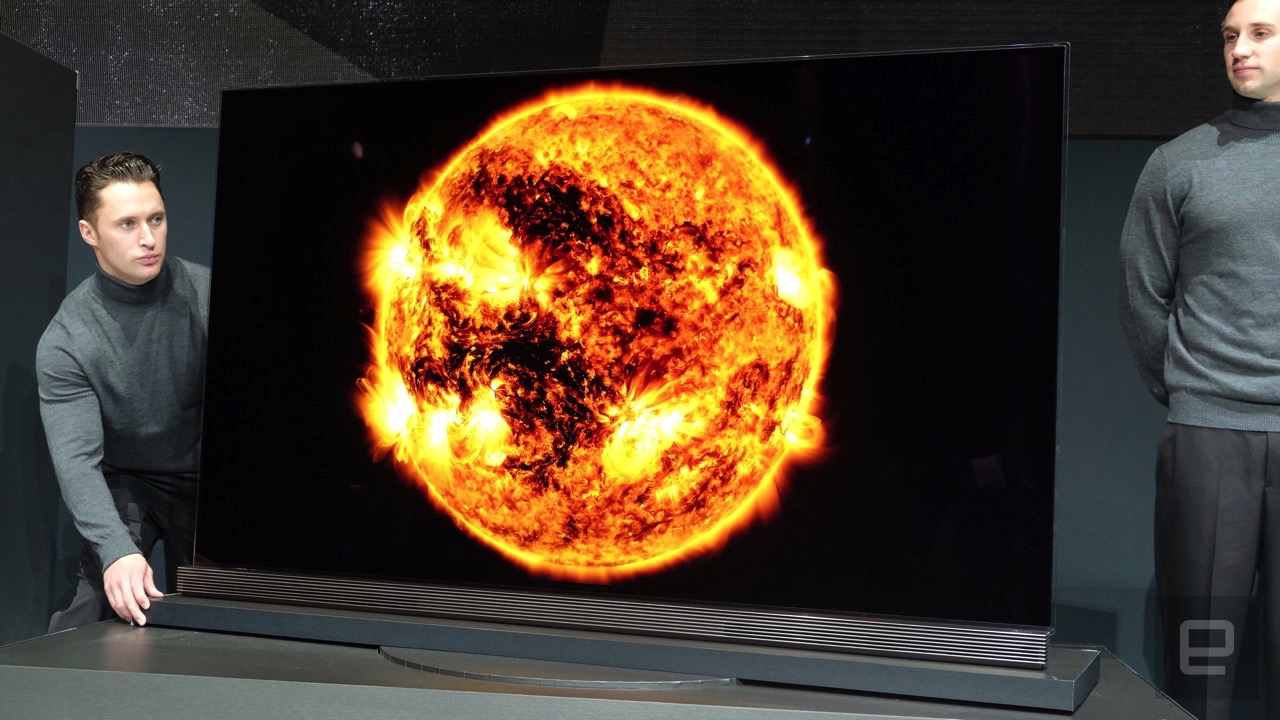
They are coming out with many variants this year--some with curved screens and even a 8K variant announced earlier.

These TVs are all loaded with the updated webOS 3.0 Smart TV platform, enabling easier access to internet video. LG's even demonstrating HDR YouTube videos, as well as shows beamed by a Las Vegas TV station, at CES 2016 to showcase the new products.
Sadly, there is no release dates and prices yet, but it does have plans to release certain models in the US sometime in the first quarter. Theseir predecessor (the LG Art Slim 4K OLED TV) won 2015's Best of CES Award for TV--so it's worth keeping an eye out for these models' availability.
These are my personal thoughts but let me know what do you think are your favorite piece of tech from CES 2016 if you have followed through!
Wednesday, January 6, 2016
Best of CES 2016: Part 1
I might be stuck in Singapore but I'm still actively following up on this CES, but this is becoming really vague line of tech right now with even stuff like smart cars appearing on CES.
One thing I've really liked is the Razer Blade Stealth.
A pretty Ultrabook--not it's not a Macbook
Quite the Ultrabook I would say, instead of the old 4 pounds beast we used to see--now the new Razer Ultrabook is going at 2.75 pounds! Kudos to Razer for being able to do this while keeping the beast inside the new Razer Blade Stealth!


Talking about PC and cases, this time round a very special case appeared in this CES too. No branding right now but we do see NZXT printed all over it. It looks like something out of a supercar and not something you would see in a traditional PC enclosure.


Pictures credit to Linus Tech Tips
Let us wait until 26 Jan to find out more!
Sandisk 1TB SSD
Definitely one of the things I'm most looking forward to, but at what cost? SSD prices might have dropped but it is still on the high side.

Vehicular Intelligence
What do we have after smartphones, smart watches? Smart cars. let's start with an unexpected brand--Microsoft. You heard it right, Microsoft.
The Vehicle Intelligence Marketplace explores the road to driverless mobility. This area features a variety of technologies that support the future of autonomous/automated driving, including parking assist, collision avoidance, emergency braking and much more.
A new thing we know from this CES is that productivity will be another feature for future smart cars.
"Bringing the power of Office 365 into Harman's connected car systems will provide new productivity solutions and transform the driving experience," said Peggy Johnson, Executive Vice President of Business Development, Microsoft, in a statement. "By ensuring that Office 365 services are seamlessly integrated with car and driver telematics and performance data, we will allow consumers to be more productive during their driving hours, while enjoying far greater convenience, safety and reliability."
In addition to Harman, Microsoft is also working with IAV to bring Windows 10 to the dash. A mobile Windows 10 device can be connected to the dash through Continuum, to bring features like "Cortana, Skype for Business, Calendar, Outlook and Groove Music" to dash while the vehicle is in auto mode.
One thing I've really liked is the Razer Blade Stealth.
A pretty Ultrabook--not it's not a Macbook
Quite the Ultrabook I would say, instead of the old 4 pounds beast we used to see--now the new Razer Ultrabook is going at 2.75 pounds! Kudos to Razer for being able to do this while keeping the beast inside the new Razer Blade Stealth!

I'm sure you have noticed this huge box over here that resembles something like a graphic card holder, and yes that is what it is. It allows more graphical power when connected to the Razer Blade Stealth, and when you need the portability you can just unplug it as well.

There are two regular USB ports and a new Thunderbolt USB Type-C port designed to charge and connect monitors and accessories. It’s also the only laptop with individually backlit RGB keys, meaning you can really customize the colors and effects on the Blade Stealth.
Talking about PC and cases, this time round a very special case appeared in this CES too. No branding right now but we do see NZXT printed all over it. It looks like something out of a supercar and not something you would see in a traditional PC enclosure.


Pictures credit to Linus Tech Tips
Let us wait until 26 Jan to find out more!
Sandisk 1TB SSD
Definitely one of the things I'm most looking forward to, but at what cost? SSD prices might have dropped but it is still on the high side.

Vehicular Intelligence
What do we have after smartphones, smart watches? Smart cars. let's start with an unexpected brand--Microsoft. You heard it right, Microsoft.
The Vehicle Intelligence Marketplace explores the road to driverless mobility. This area features a variety of technologies that support the future of autonomous/automated driving, including parking assist, collision avoidance, emergency braking and much more.
A new thing we know from this CES is that productivity will be another feature for future smart cars.
"Bringing the power of Office 365 into Harman's connected car systems will provide new productivity solutions and transform the driving experience," said Peggy Johnson, Executive Vice President of Business Development, Microsoft, in a statement. "By ensuring that Office 365 services are seamlessly integrated with car and driver telematics and performance data, we will allow consumers to be more productive during their driving hours, while enjoying far greater convenience, safety and reliability."
In addition to Harman, Microsoft is also working with IAV to bring Windows 10 to the dash. A mobile Windows 10 device can be connected to the dash through Continuum, to bring features like "Cortana, Skype for Business, Calendar, Outlook and Groove Music" to dash while the vehicle is in auto mode.
Tuesday, January 5, 2016
Neffos smartphone by TP-Link
I do not know why, but apparently it is confirmed that we will see the Neffos smartphone coming out--made by TP-Link.
If you ask me, the smartphone market is now too saturated and phones are getting better and cheaper. I have no idea on the approach that TP-Link would go with their Neffos phone, but I believe it to be a simple and no frills smartphone with decent specs.

What sort of smartphone do you think we will be seeing from TP-Link? The smartphone market is now really saturated so what do you think TP-Link can do to stand out from the likes of brands like One Plus, Xiaomi and Oppo right now?
If you ask me, the smartphone market is now too saturated and phones are getting better and cheaper. I have no idea on the approach that TP-Link would go with their Neffos phone, but I believe it to be a simple and no frills smartphone with decent specs.
What sort of smartphone do you think we will be seeing from TP-Link? The smartphone market is now really saturated so what do you think TP-Link can do to stand out from the likes of brands like One Plus, Xiaomi and Oppo right now?
Friday, January 1, 2016
My favorite tech of the year 2015
There are some great smartphones and other tech stuff that came out in 2015, and not surprisingly--Google have a few of their products up here. Read on to find out more!
Phones
1. Huawei Nexus 6P
2. LG Nexus 5X
3. Samsung Galaxy Note 5/S6 and variants
4. LG V10
5. iPhone 6S/6S Plus
Tablets
1. iPad Air 2
2. iPad Mini 4
3. Dell Venue 7000
4. Samsung Galaxy Tab S2 9.7"
5. Samsung Galaxy View
Laptops
1. Macbook Retina display 2015
2. Asus UX305
3. Macbook Air
4. Microsoft Surface Book
5. Macbook Pro 15" Retina
The list above is in no particular order and it is what I feel is the top devices of 2015, HTC have failed to impress this year with their flagship A9 phone. Let's see what they can do for the year 2016, I do hope that they learn their lesson this year from the popular flagships like the Note 5 and the V10.
Others tech stuff
1. Codistas Microflip USB
2. Google Chromecast
3. iPhone 6S battery case
Do let me know about what you think and are the items above in your list as well? Never too late to get yourself or your loved ones a new year gift!
Phones
1. Huawei Nexus 6P
2. LG Nexus 5X
3. Samsung Galaxy Note 5/S6 and variants
4. LG V10
5. iPhone 6S/6S Plus
Tablets
1. iPad Air 2
2. iPad Mini 4
3. Dell Venue 7000
4. Samsung Galaxy Tab S2 9.7"
5. Samsung Galaxy View
Laptops
1. Macbook Retina display 2015
2. Asus UX305
3. Macbook Air
4. Microsoft Surface Book
5. Macbook Pro 15" Retina
The list above is in no particular order and it is what I feel is the top devices of 2015, HTC have failed to impress this year with their flagship A9 phone. Let's see what they can do for the year 2016, I do hope that they learn their lesson this year from the popular flagships like the Note 5 and the V10.
Others tech stuff
1. Codistas Microflip USB
2. Google Chromecast
3. iPhone 6S battery case
Do let me know about what you think and are the items above in your list as well? Never too late to get yourself or your loved ones a new year gift!
Wi-Fi Assist on iOS 9
With the new iOS 9 updates, there’s a setting under WiFi called” WiFi Assist”. Be wary of this if you have data or go on a prepaid data service, this will automatically use your data if they sense a poor Wi-Fi connection.

This will use your cellular data when WiFi connection is poor to ensure constant connectivity. This is a double-edged sword but good for those with high data plans. Just a side note, if you haven't bought the game Dying Light on PC get it now since it is going for $24--which is like 66% off! Get it here!
Here's wishing everyone a wonderful new year of wealth and health!
Subscribe to:
Comments (Atom)